License & Support
Support Scope
Maintenance and support services are governed by your agreement with dab and the applicable Support Policy. Where these services are included in your agreement, technical support is limited to investigating and resolving suspected unintended behavior in dab Nexus within that agreed scope.
Before reporting a suspected defect, analyze your system environment where possible and provide the information and access required for investigation. Installation and updating of dab Nexus, customer infrastructure, configuration work, migrations, relocations, server replacements, third-party systems, consulting, training, and functional enhancements are not part of standard maintenance and support. Assistance with this work requires a separate agreement.
dab can accompany the initial setup of dab Nexus if agreed in advance. This does not transfer responsibility for the installation, infrastructure, or environment to dab.
License
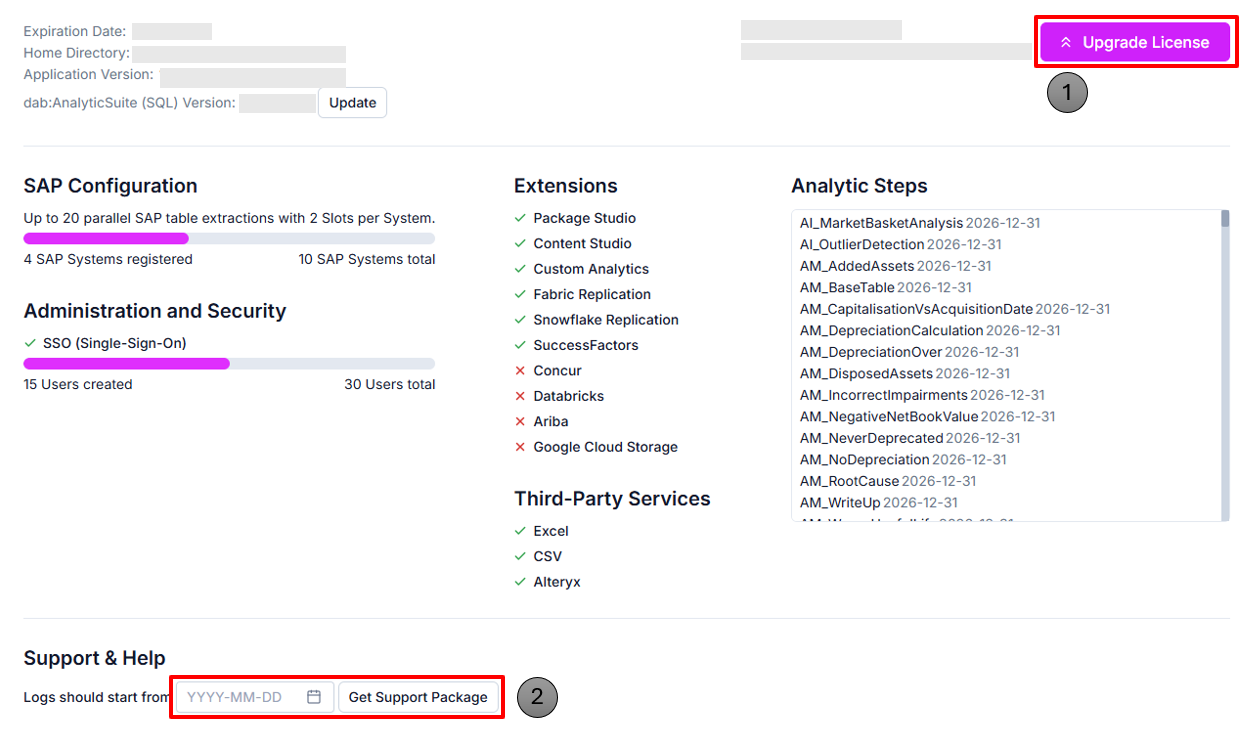
Click on Upgrade License. You get an option to either do an Online Activation or an Offline Activation.
dab Nexus Support-Package Creation
Before Contacting Support
A screenshot showing only an error message is not sufficient for investigation. Please provide:
- Your dab Nexus version and deployment type: On-Premise or Managed App
- A short description of the expected and actual behavior
- The steps to reproduce the problem, including the affected task or run
- The complete Support Package and the exact error message
Include screenshots only as additional context. Missing information may delay the investigation.
If problems occur in dab Nexus, you can create a Support-Package and send it to our support team. In this package, all activities of the application are logged in a series of log files.
You can send this Support-Package to our Support-Team via Mail: support@dab-gmbh.de
To create it, click on Settings > License & Support on the left. In the Support & Help section you will find the button Get Support Package.
You can optionally enter a date from which the logs are selected in order to make the Support-Package smaller. This is particularly useful if problems occur from a certain date or time.
By clicking on Get Support Package, dab Nexus creates this package and saves it in your download folder.